Project
TouchKeys
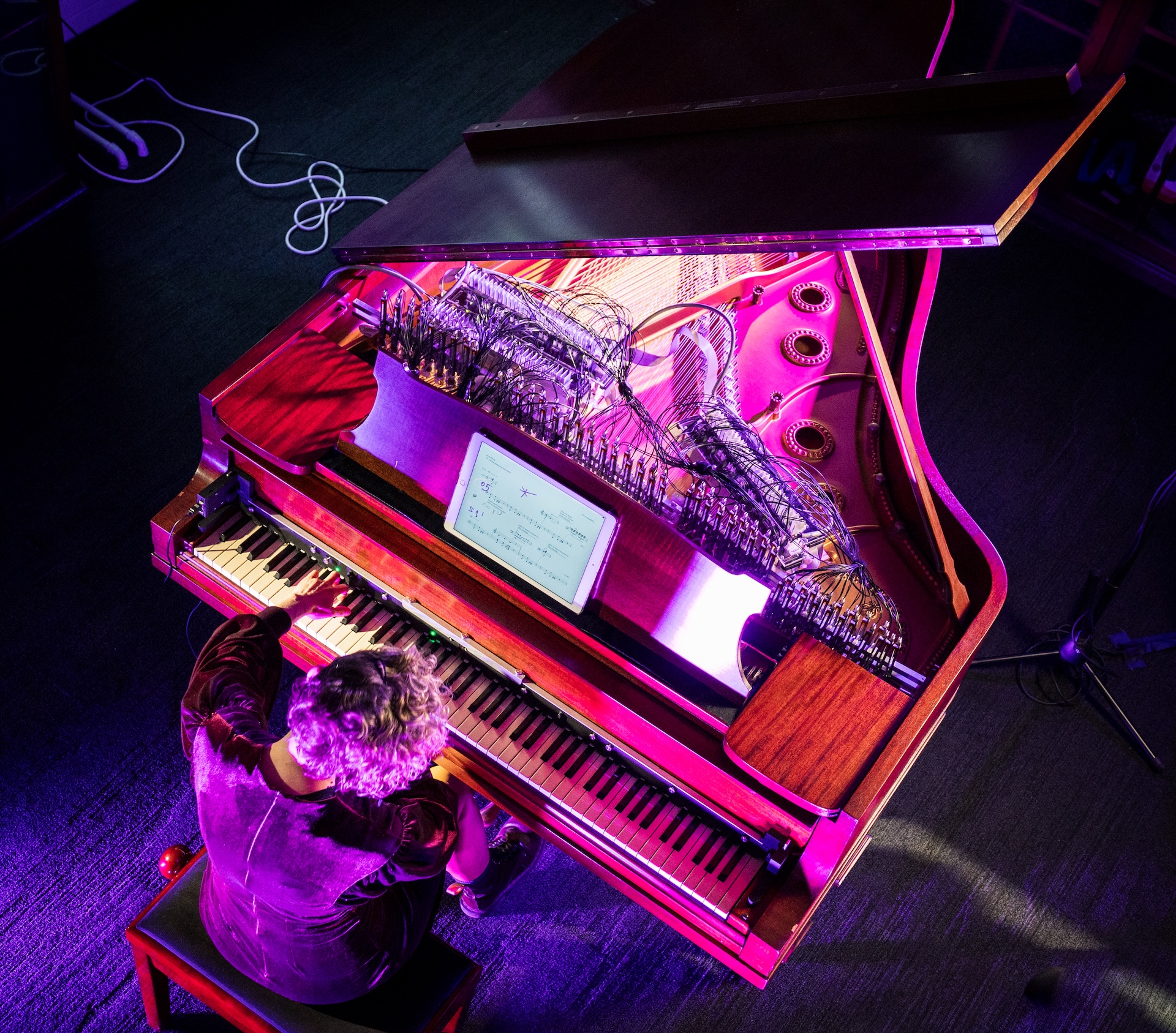
TouchKeys integrates capacitive touch sensing into the traditional piano-style keyboard. Sensors measure the position of each finger on the key surfaces, enabling new playing techniques while retaining the familiar feel of the keyboard. Self-install kits and flexible mapping software lets TouchKeys integrate into the world of commercial MIDI keyboards, synths and digital audio workstations, while OSC support and open-source mapping allow for more experimental uses. TouchKeys was available as a commercial product from 2013-2022, building a worldwide community of players.
TouchKeys is a new musical instrument transforming the piano-style keyboard into a versatile multi-touch control surface. TouchKeys sensors can be added to the surface of any keyboard, using capacitive touch sensing to measure the location of the musician’s fingers on the keys during performance.
The project was launched on the crowd-funding website Kickstarter in 2013. Instruments and DIY kits were available to musicians through 2022, building a player community of hundreds of musicians. This page is about the TouchKeys research project. For practical details on working with TouchKeys, see the TouchKeys instrument page.
Overview
TouchKeys is based on capacitive touch sensing, the same technology that powers smartphone screens and trackpads. Sensors in the shape of each piano key measure the location and contact area of the player’s finger on the key surface. This information is transmitted to a computer which combines it with MIDI data from the host keyboard. Flexible mappings allow the player to select how their finger movements control their synths and plug-ins.
Capacitive Touch Sensing
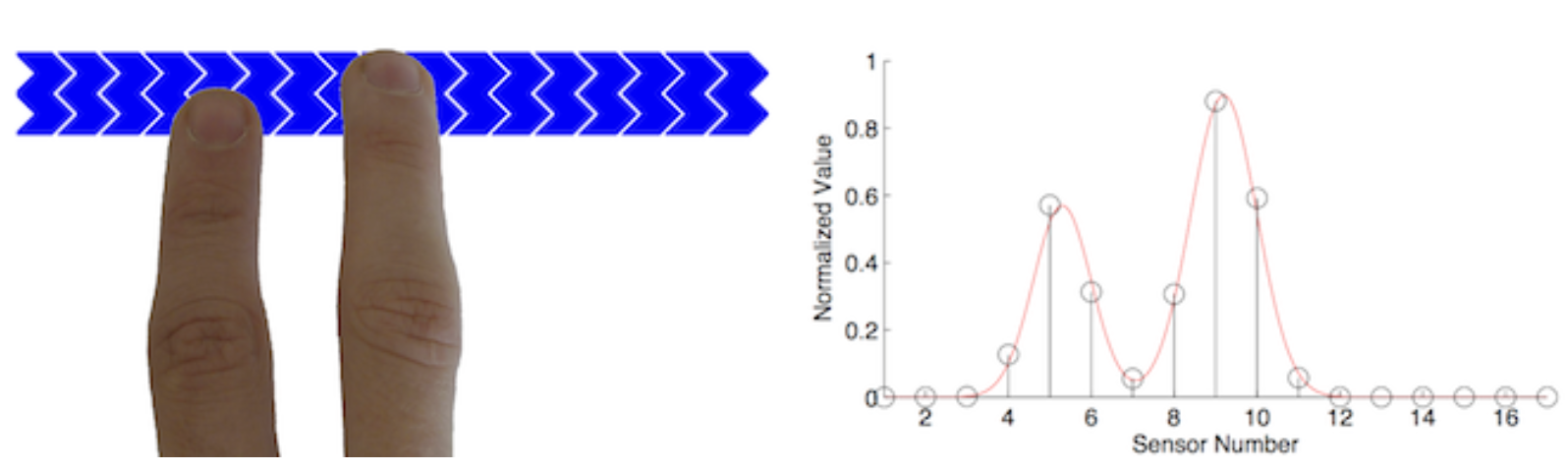
The sensors work by measuring the capacitance of a collection of small conductive pads on the surface. Touching the key causes several adjacent pads to increase in capacitance. A microcontroller on the key interpolates between the values to arrive at a precise estimate of the finger location. Contact area can be sensed by observing the overall magnitude of change in capacitance.
Each key has its own capacitive touch sensing microcontroller. They connect to a set of boards which aggregate the data into a single stream to be sent to the computer by USB.
Some of the technical features of TouchKeys include:
- High-resolution position measurement with over 1500 points of resolution in the long axis, 256 points in the narrow axis. That’s sub-millimetre precision!
- XY position on every key, including the black keys. (The narrow part of the white keys senses on the long axis only.)
- Contact area measurement distinguishes the tip and the pad of the finger, and can indicate finger pressure in some circumstances.
- Up to 3 touches per key allows new multi-finger techniques on the keyboard.
- 200Hz sample rate makes for a natural, low-latency interaction.
- Configurable keyboard size: the sensors can install on anything from a 2-octave portable keyboard to a 97-key Boesendorfer Imperial Grand piano.
Read about the hardware design of TouchKeys:
'TouchKeys: capacitive multi-touch sensing on a physical keyboard'
Mappings
Like many digital instruments, TouchKeys operates on the principle of mapping, where the relationship between sensor data and sound production is configurable in software. The TouchKeys software (available for Mac, Windows and Linux) can work with many different features of the sensor data, including X and Y location, contact area, and movements of two or three fingers on the same key.
To help TouchKeys coexist with familiar keyboard playing techniques, some of the algorithms filter out accidental or unwanted finger movement: for example, shaking the finger back and forth horizontally can create a vibrato, but it is already common to move the finger horizontally on the keyboard when moving the hand. To avoid false triggers, the software looks for a movement forward and backward in quick succession and only engages the vibrato after this happens.
The outputs of the mappings can be sent to hardware and software synths by MIDI or by OSC.
Read about how we studied piano technique to design TouchKeys:
'The space between the notes: adding expressive pitch control to the piano keyboard'
Some examples of mappings and playing techniques include:
- Shake the finger side-to-side to produce a vibrato.
- Slide the finger up or down the key to produce a pitch bend. With a compatible synth, the pitch of each note can be controlled individually.
- Alternatively, use finger motion to control filter or modulation effects. The movement of the fingers can be mapped to any MIDI or OSC parameter.
- Add or remove a second finger on the key to retrigger the note, which can be played more rapidly than releasing and restriking the key.
- Play microtonally by mapping different regions of each key to different notes in a microtonal scale.
- Emulate subtle playing techniques of string and wind instruments by pulling the finger along the key as you release a note.
TouchKeys in a Musical Ecosystem
Like the magnetic resonator piano, TouchKeys is an augmentation of the piano keyboard, but it occupies a different musical niche. TouchKeys is adapted to work with MIDI keyboards and synths and digital audio workstation software, controlling a player’s existing sounds rather than having one sound of its own. Hundreds of musicians worldwide have acquired TouchKeys kits and instruments, and many of them use TouchKeys in studio environments. During the 2013 Kickstarter campaign for TouchKeys, I made a number of demo videos showing a variety of synths and playing techniques:
Further videos showing how to connect TouchKeys to different synths have been contributed by its user community and are available on Andrew McPherson’s YouTube channel.
TouchKeys has also been integrated into larger performance practices as in Palle Dahlstedt’s Living Strings:
TouchKeys received substantial press coverage after its introduction on Kickstarter. Read some of those articles on our press page.
External links
- TouchKeys software downloads: binary releases (Mac/Windows/Linux), source code, software manual
- Installation instructions for TouchKeys kits: written guide, tutorial video